27 ago 2020

How To Change Facebook’s Default Theme To Any Color You Want

Change Facebook Theme Using Chrome Extension

How To Change Facebook's Default Theme To Any Color You Want

We are going to share an interesting trick on changing your Facebook default theme. You just need a Google Chrome extension to perform this trick. If you are among me who feels very fatigued with the look of Facebook's by default theme then this is a must-see post because you will find out the easiest trick to make your facebook more attractive than before.

Facebook is a social networking site which empowers people to connect with friends and people around. That's how Facebook is habitually introduced. However, Facebook is beyond the need of being introduced as almost everyone is on it.
   A couple of Days ago I was simply Surfing Google Chrome website and I somehow stumbled upon a Chrome Extension. Yes, a Chrome extension that will give your Facebook a Whole new look. I was apprehensive to try it, So I just installed it and checked my facebook. I was astonished to see my facebook homepage have all new look. I found it refreshing and decided to write steps on How to Change Facebook Themes using Chrome Extension.

How To Change Facebook's Default Theme To Any Color You Want

If You are among me who feels very fatigued with the look of Facebook's by default theme then this is a must-see post, Because you will find out the easiest trick to make your facebook more attractive than before. Simply follow the steps to know about it.

How to Change Facebook Theme Using Chrome Extension

Step 1. Install Stylish for Chrome from the Chrome Web Store. It will take hardly a minute to get installed in your Chrome browser.
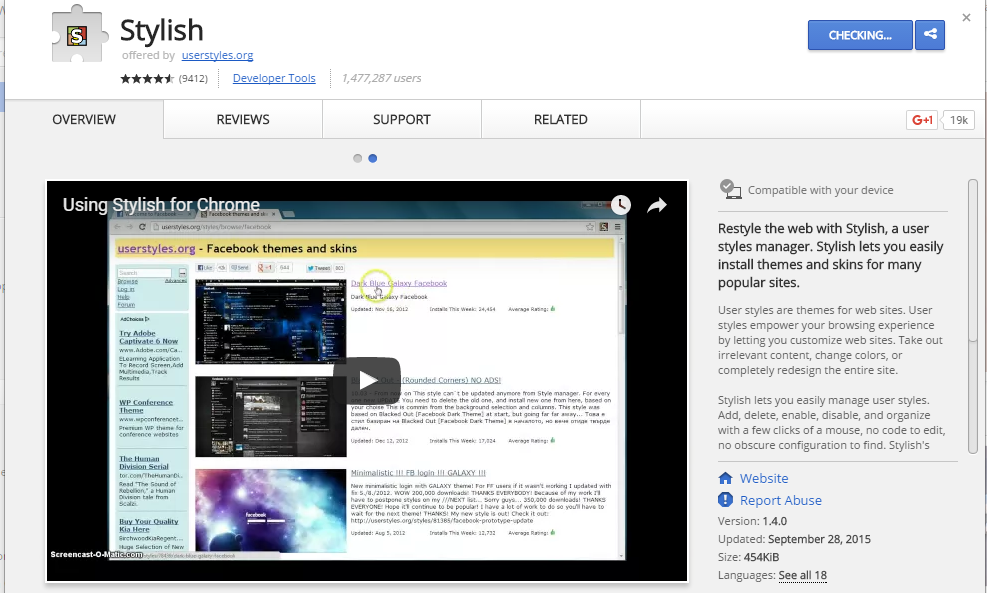
Change Facebook Theme Using Chrome Extension
Step 2. Navigate to Facebook.com and click on the S button. Click on Find Styles for this Site to open a new tab with free themes to use for Facebook. Most of the themes are free and attractive too you can easily browse over the full website to discover your favorite theme.
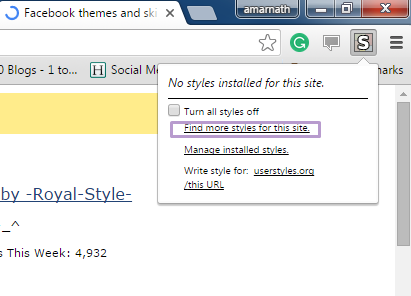
Change Facebook Theme Using Chrome Extension
Step 3. Now You will be redirected towards https://userstyles.org Guess what! This site contains huge numbers of Facebook themes, One thing is for sure that you will be confused in-between what to select and which one to skip. Select any them and click on it. Now you will be given a full preview of your selected theme.
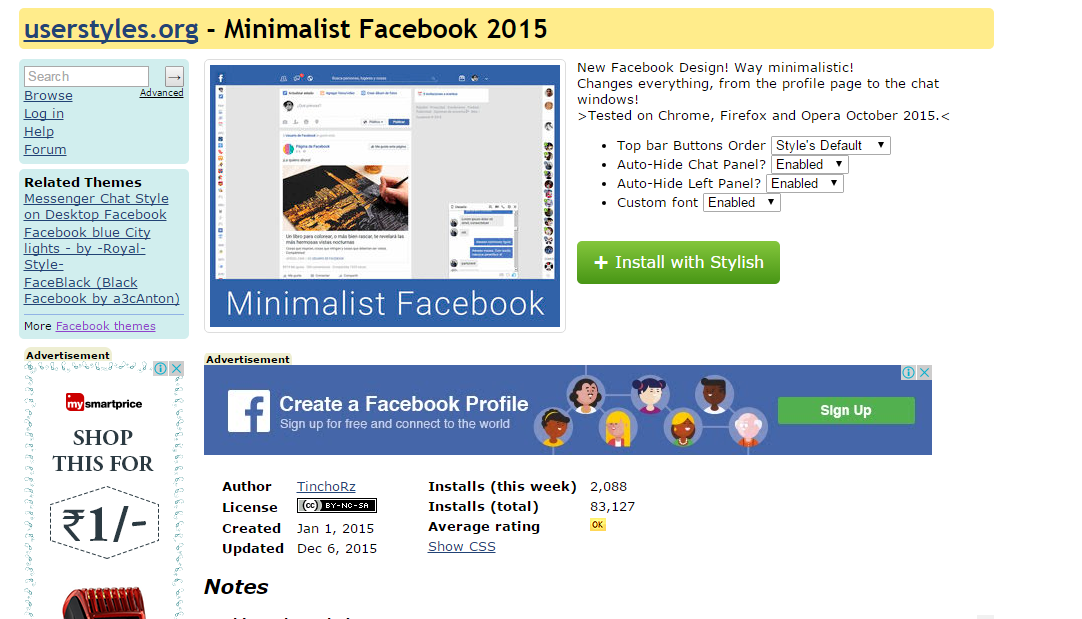
Change Facebook Theme Using Chrome Extension
Step 4. If everything is fine in the previewed theme, click on Install with Stylish button at the top right corner of the page. It will take few seconds or minutes depends on your theme size to be installed in Stylish Extension, once installed you will be notified with a success message.
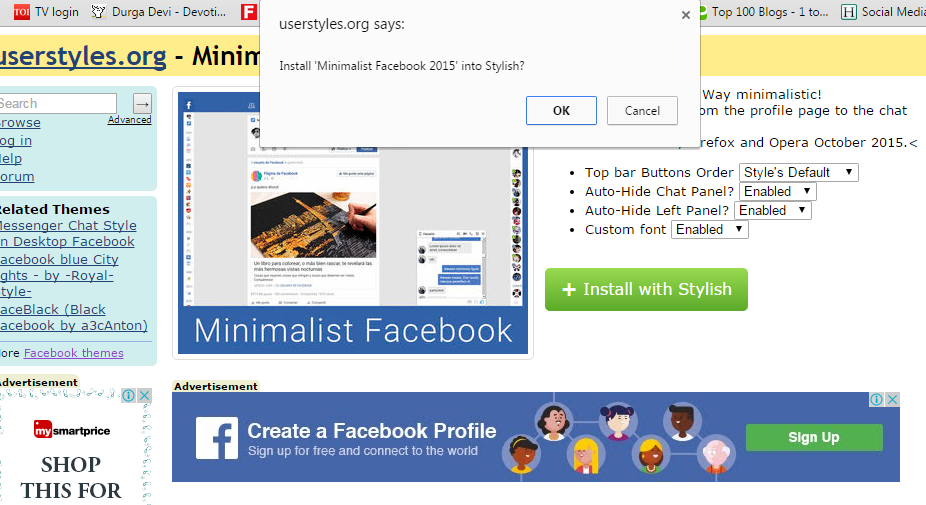
Change Facebook Theme Using Chrome Extension
Step 5. Now whenever you open Facebook, it will show the theme that you have installed with Stylish instead of the boring old blue theme.
Change Facebook Theme Using Chrome Extension

More articles


  1. Tools Used For Hacking
  2. Hacker Tools Hardware
  3. Hack Tools For Ubuntu
  4. New Hack Tools
  5. Pentest Tools Port Scanner
  6. Pentest Tools Review
  7. Pentest Automation Tools
  8. Pentest Box Tools Download
  9. Hack Tools Download
  10. How To Hack
  11. Nsa Hack Tools
  12. How To Install Pentest Tools In Ubuntu
  13. Hacking Tools Kit
  14. Pentest Tools Framework
  15. Tools 4 Hack
  16. Hacker Tool Kit
  17. Pentest Tools Github
  18. Hacking Tools Pc
  19. Pentest Tools Tcp Port Scanner
  20. Hacker Tools For Windows
  21. Hacker Tools Hardware
  22. Pentest Tools Url Fuzzer
  23. Hackers Toolbox
  24. Hack Tools Pc
  25. Hacker Tools
  26. Pentest Tools Framework
  27. Hacker Techniques Tools And Incident Handling
  28. Growth Hacker Tools
  29. Hackers Toolbox
  30. Hacking Tools Pc
  31. Black Hat Hacker Tools
  32. Pentest Tools For Ubuntu
  33. Hacker Tools For Windows
  34. Hacking Tools Hardware
  35. Hacker Tools Online
  36. Hacker Techniques Tools And Incident Handling
  37. Hacking Tools For Mac
  38. Hacking Tools
  39. Hacker Tools Online
  40. Kik Hack Tools
  41. How To Make Hacking Tools
  42. Hacking Tools Github
  43. New Hack Tools
  44. Pentest Tools Download
  45. Easy Hack Tools
  46. Tools For Hacker
  47. Pentest Tools Download
  48. How To Hack
  49. Pentest Tools Find Subdomains
  50. Hacking Tools Usb
  51. Pentest Reporting Tools
  52. Hack Tools Mac
  53. Hacking Tools For Games
  54. Usb Pentest Tools
  55. Pentest Tools Review
  56. Hack Tools
  57. Growth Hacker Tools
  58. Hacker Search Tools
  59. Pentest Tools For Windows
  60. Hacking Tools For Windows 7
  61. Pentest Tools Github
  62. Pentest Tools Website Vulnerability
  63. Bluetooth Hacking Tools Kali
  64. Hacking Tools Hardware
  65. Pentest Tools List
  66. Hacking Tools Usb
  67. Hack Website Online Tool
  68. Hack Tools For Ubuntu
  69. Hacker Tools Software
  70. Pentest Tools Github
  71. Hacking Apps
  72. Hack Tools Online
  73. Hacker Search Tools
  74. Hacker Tools For Mac
  75. Free Pentest Tools For Windows
  76. Hack And Tools
  77. Hacking Tools For Windows Free Download
  78. Hacker Tools 2020
  79. Hacker
  80. Pentest Tools Alternative
  81. Hacker Tools For Ios
  82. What Are Hacking Tools
  83. Pentest Tools Kali Linux
  84. Hacker Hardware Tools
  85. Pentest Tools Tcp Port Scanner
  86. Hack Tools 2019

Top 5 Most Useful Linux Tools For Programmers

Top 5 most useful linux tools for Programmer

Linux is a free and open-source software operating systems built around the Linux kernel. It typically packaged in a form known as a Linux distribution for both desktop and server use. It is a great development environment for programmers and developers. However, without the development tools, that would be impossible. Fortunately, plenty of Linux tools are available. Here are the top 5 most useful Linux tools for programmers.

Also Read;-  How To Clone One Android To Another

5 Most Useful Linux tools for Programmers

1. VIM

vim editor-compressed
VIM is a free and open source software written by Bram Moolenaar in 1991. It is designed for use both from a command-line interface and as a standalone application in a graphical user interface. It comes standard with almost every Linux distribution and is also known as "the programmer's editor". VIM is great for coding and can also be used for editing things like configuration files and XML documents.
Vim has been developed to be a cross-platform that supports many other platforms. In 2006, it was voted as the most popular editor amongst Linux Journal readers. In 2015, Stack Overflow developer survey found it to be the third most popular text editor while in 2016, the Stack Overflow developer survey found it to be the fourth most popular development environment.
Read more;-  How To Use WhatsApp without Mobile No

2. Zsh

Zsh is written in C and initially released in 1990. It is a Unix shell that can be used as an interactive login shell and as a powerful command interpreter for shell scripting. Zsh is an extended version of Bourne shell (BASH) with a large number of improvements, including some features of Bash, ksh, and tcsh. Zsh gives a user-friendly experience on the command line. It also gives better auto-completion, Vim key bindings, and smart guesses when you write a command wrong.
Its features include (but not limited to):
  • Programmable command-line completion,
  • Sharing of command history among all running shells
  • Extended file globbing
  • Improved variable/array handling
  • Editing of multi-line commands in a single buffer
  • Spelling correction
  • Various compatibility modes,
  • Themeable prompts, and
  • Loadable modules.

3. Byobu

It was initially released in 2009 written in Sh and Python. Byobu can be used to provide on-screen notification or status and tabbed multi-window management. Thus, it is intended to improve terminal sessions when users connect to remote servers with an operating system Linux and Unix-like. It is is an enhancement for the GNU Screen terminal multiplexer or tmux used with the GNU/Linux computer operating system.

4. GIT

git commandsGit was initially released on April 7, 2005. It is a version control system to track changes in computer files and to coordinate work on those files among multiple people. It is primarily used for source code management in software development and can be used to keep track of changes in any set of files available in the English language. It is aimed at speed, data integrity, and support for distributed, non-linear workflows. It is free and open source software distributed under the terms of the GNU General Public License version 2.
Moreover, Linus Torvalds was the creator of GIT for the development of the Linux kernel. On the other hand, its current maintainer since then is Junio Hamano. Thus, every Git directory on every computer is a full-fledged repository with complete history and full version tracking abilities, independent of network access or a central server.

5. Docker

Written by Solomon Hykes in 2013, it is a computer program that performs operating-system-level virtualization, the containerization, which is developed by Docker, Inc. Primarily, Docker was developed for Linux to use as the resource isolation features of the Linux kernel. It is a tool that can package an application and its dependencies in a virtual container that can run on any Linux server. This helps enable the flexibility and portability on where the application can run, whether on premises, public cloud, private cloud, bare metal, etc.  Moreover, it accesses the Linux kernel's virtualization features either directly using the libcontainer library.

Related posts


26 ago 2020

November 2019 Connector
OWASP
Connector
November 2019

COMMUNICATIONS


Letter from the Vice-Chairman

Dear OWASP Community, 

Preparation for next year's conferences is underway. I had the pleasure of meeting people from our community at a recent ISACA Ireland event where I had an OWASP stand. I also had lots of swag to give away, loads left which I plan to share out amongst the community. 

I was on a call recently with both WIA leadership and a number of individuals looking to broaden our diversity reach, forming DIA (diversity in AppSec). This was a positive call and I look forward to reviewing their proposal under the committee 2.0 operating model.

I'd like to thank our volunteers, chapter and project leaders for making OWASP what it is today. We wouldn't have a foundation without you. We always want to make things better, to this end, it would be great if you could fill out the following feedback form.

Thank you, 
Owen Pendlebury, Vice-Chairman

FROM THE EXECUTIVE DIRECTOR


As we wind down 2019, we are planning lots of new opportunities to get involved with OWASP next year. The current working draft of the 2020 Operating Plan can be found on our staging site for our new website which is planned to launch next month.
 
Some of the highlights for 2020:
  • Quarterly Town Hall meetings.
  • Two Project Summits - the first in February 2020
  • Pilot single-day AppSec Days worldwide to offer local training and community.
We are also set to further increase the transparency of the daily workings of OWASP through our Staff Projects page. The pages linked there will always be a work in progress; some of which today are still only templates but still a great resource to know what's going on at OWASP.

All of this which adds to our Global and Regional Events, ongoing local chapter support, and other member activities. Our plans are ambitious and we look forward to your continued support this and every month as we look to better secure the web.


OWASP Foundation Global AppSec Event Dates for 2020

Global AppSec Dublin, June 15 - 19, 2020
(Formerly known as AppSec EU)
Sponsorship is now available
Call for Papers & Call for Training December 2019

 
Global AppSec San Francisco, October 19 - 23, 2020

(Formerly known as AppSec US)
CFP &  CFT February 2020

** Visit our website for future announcements.**
NEW OWASP Project Summit - Winter 2020
February 2020 in Cancun, Mexico

 
The OWASP Foundation will host a three-day working session for FIVE selected projects in Cancun, Mexico, February 2020. Arrival day will be Wednesday the 19th and departures will be the 23rd. Projects must apply and then get selected to participate. The application process will require project meeting goals, work plans, key contributors, and expected attendance. The OWASP Foundation Officers Group will make the final selection. For more information click here

You can also email Emily Berman Global Events Director or Harold Blankenship Director of Technology and Projects.
Announcing a New Opportunity to become part of a Global AppSec Program Team
 
Conference Program Teams are constituted for each Global AppSec event and consists of members of OWASP members and staff. The selection of team members is based on subject-matter expertise and a balanced representation of the OWASP community. For planning purposes, team members shall reside on the continent of the Global AppSec for which they serve. Teams are constituted no later than six months prior to the Global AppSec event.

To apply to become a member of the Conference Program Team click here.


We are so excited to announce that both the London OWASP and WIA community have been asked to speak at BlackHat Europe 2019 on Wednesday 4 December at the EXCEL London.   Andra Lezza is leading the panel of women to "Share insights gained at different stages of their careers to help other women in the field."  Thank you, Andra, for leading the initiative and also to Sonya Moisset, Bibi Sanjarani, Katy Anton and Lauren Chiesa for volunteering to be part of the panel.  Also from the OWASP Community and a London Chapter Leader Sam Stepanyan and Paul Harragan.  Sam and Pau will be presenting a more in-depth demo on the OWASP Nettacker.  Good luck to all the speakers have a great conference.

I would like to encourage all of the OWASP community that will be attending BlackHat Europe to please make every effort to attend and support our fellow OWASP members Wednesday, 4 December 2019. (Click to view the schedule details.)

OWASP Members don't forget you are eligible for € 200.00 discount, email marketing@owasp.org for code to use when registering.


BlackHat Europe has extended an invitation to our London WIA community  to  lead a panel to "Share insights gained at different stages of their careers that could help other women in the field."  Thank you to Andra Lezza for leading this initiative and Sonya Moisset, Bibi Sanjarani, Katy Anton and Lauren Chiesa for volunteering to be part of the panel and to contribute.  Good luck I am sure your session will be a huge success.

BlackHat Europe 2019 London at EXCEL London
2019 December 2-5 
The OWASP Booth 1015
Business Hall December 4 & 5 
December 4, 10:30 AM - 7:00 PM
December 5: 10:00 AM - 4:00 PM

EVENTS 

You may also be interested in one of our other affiliated events:


REGIONAL EVENTS
Event DateLocation
German OWASP Day 2019 December 10, 2019 Karlsruhe, Germany
AppSec California 2020 January 21 - 24, 2020 Santa Monica, CA
OWASP New Zealand Day 2020 February 20 - 21, 2020 Auckland, New Zealand
OWASP Seasides March 3 - 5, 2020 Panjim Goa, India
SnowFROC 2020 March 5, 2020 Denver, CO
AppSec Morocco & Africa 2020 June 4 - 5, 2020 Rabat, Morocco

GLOBAL PARTNERSHIP EVENTS
Event Date Location
BlackHat Europe 2019 December 2 - 5, 2019 London

PROJECTS


As the foundation moves toward the migration of the OWASP web presence from the old wiki site to our new Github-hosted home, some of you may still have questions regarding what to move and how to move it. Essentially, if you have a chapter page or project page and you have not migrated it to the new website, that would be first. Steps on what to do and what is needed can be found at https://www2.owasp.org/migration There are also some minor instructions on the default project or chapter page itself. And if you are wondering where that page is located, you can go to https://github.com/OWASP and type your chapter name in the repository search bar. If your project or chapter is not there, contact me. Lastly, there are a number of excellent examples already done by other leaders (also linked on the migration page).

And, as a precaution, you should click over into the 'Settings' of your repository and then click the 'Collaborators & teams' link on the left menu and check to make sure that the usernames added to Collaborators match what you expect.  Having someone you do not know edit your web page without your knowledge is no longer the expected behavior.

Some resources, mostly for projects, have been uploaded to the OWASP Site Theme Repository and can be linked to via the /assets/image/common/<file> URL.

After your chapter or project page is done, there is a www-community repository which would include any files from the wiki that are not currently in a project or chapter or board/staff policy area.  For instance, there are pages there for GSoC and XSS and CSRF.  A list of the top pages that need to be migrated can be found attached to one of the TODO cards on our website migration Trello board which you are invited to join if you want to help migrate loose pages and/or perform some automation work.

Our current plan can be found on the Website Relaunch project page.

PROJECT ANNOUNCEMENT

As part of OWASP's participation in Google's Season of Docs, the ZAP project has had Nirojan Selvanathan (@sshniro)  working on API documentation.  The first iteration of the documentation is now live.  It includes Java, Python, and shell
example snippets all presented in a responsive and accessible design which we will continue to build on in the future.

Big thanks to Nirojan for his efforts on this wonderful initiative!
Congratulations and thanks to Google Open Source for helping to bring the open-source and technical writer communities together!

COMMUNITY

 
Welcome to our New OWASP Chapters

Colombo, Sri Lanka
Des Moines, IA
Harrisburg, PA
Louisville, KY
Monterrey, Brazil
Moscow, Russia


Contributor Corporate Members


*Ads and logos are not endorsements and reflect the messages of the advertiser only. *
Join us
Donate
Our mailing address is:
OWASP Foundation 
1200-C Agora Drive, #232
Bel Air, MD 21014  
Contact Us
Unsubscribe


This email was sent to *|EMAIL|*
why did I get this?    unsubscribe from this list    update subscription preferences
*|LIST:ADDRESSLINE|*